
Quick answer
Booking.com reviews come from completed, verified stays, so a guest usually cannot post unless the reservation actually checked out. That gives them more weight than open platforms, but Booking.com still moderates them under its own review and content rules. For operators in 2026, the live issues are who qualifies to leave feedback, how overall scores and recent comments are displayed, how property replies appear, and what can be challenged. Reviews that breach policy can be removed, but outcomes usually turn on fast filing, clear evidence, and citing the right rule rather than using the basic flag alone.
We handle review acquisition and disputed-review removals across Google, Trustpilot, Yelp, Clutch and travel platforms, and the same pattern keeps showing up here: owners lose time when they file a generic complaint instead of matching the review to a specific policy breach and attaching booking records, message history, or proof the stay never happened. Across 12,000+ negative review cases logged in our own files from June 2025 to June 2026, timing and evidence quality were the two variables that changed outcomes most often.
This page treats booking.com reviews the way an operator has to treat them: as a workflow from checkout to score display, response, flag, evidence pack and final moderation decision, including the dead ends that waste days.
What changed in Booking.com reviews in 2026
Booking.com reviews changed in 2026 in three separate ways: policy wording, Partner Hub workflow, and score display, and mixing those up is where most property teams waste time.
The policy side is the part most searchers actually mean when they look for a Booking.com reviews update. In 2026, Booking.com continued to tighten the line between content that should be moderated under its review and content rules, and content that should stay live even if a property says it feels unfair. That matters because a rule change affects dispute grounds, while a screen change does not. At BGR Review, the first triage step on any review issue is to label it correctly before anyone files anything, because the wrong route usually ends with a boilerplate rejection.
| Change type | What actually changed in 2026 | What it affects |
|---|---|---|
| Policy changes | Help and partner guidance in 2026 put more emphasis on eligibility, authenticity and content-rule breaches rather than “bad experience” arguments. | Whether a dispute has a real removal basis. |
| Interface changes | Partner-facing review actions and response paths have shifted inside the extranet and Partner Hub flow during 2026. | Where your team responds, flags and tracks status. |
| Score-display changes | Booking.com’s public presentation keeps pushing readers toward the aggregate property score and recent review mix, not a simple star-style view. | How guests read reputation at a glance. |
If you are checking a 2026 update, use Booking.com’s dated help-page wording first, then verify whether the issue is a policy question or a display question. That sounds basic. It is also the difference between a fixable dispute and a support ticket that goes nowhere.
How Booking.com reviews work for guests and properties
Booking.com reviews come from a closed post-stay system: the guest must have completed the booking, the review invite opens after checkout, and the property handles the published feedback inside the Booking.com Extranet.
That completed-stay rule is the first filter. A cancelled reservation, no-show, or enquiry that never turned into a finished booking does not create the normal Booking.com review route. The invitation is tied to the reservation record, which is why fake-review complaints often turn on one simple check first: can the stay be matched to a real booking ID and completed checkout in the property account.
The timing is fixed by Booking.com, not by the property. After checkout, the guest gets a limited review window and then the form closes at Booking.com’s deadline, so late complaints often cannot be turned into a standard guest review at all. If you are trying to work out what was posted and when, the Extranet is the place to check because that is where properties see incoming reviews, monitor status, and submit owner replies.
That workflow matters in practice. When owners contact BGR Review before paying $449 per removed review link on a success-only basis, one of the first checks is whether the review sits in the Extranet against a completed stay or whether the problem belongs to a different Booking.com support route entirely.
Who can leave a review and what counts as an eligible stay
An eligible Booking.com review usually comes from a guest who completed a reservation made through Booking.com and reached the scheduled check-out point in that booking flow.
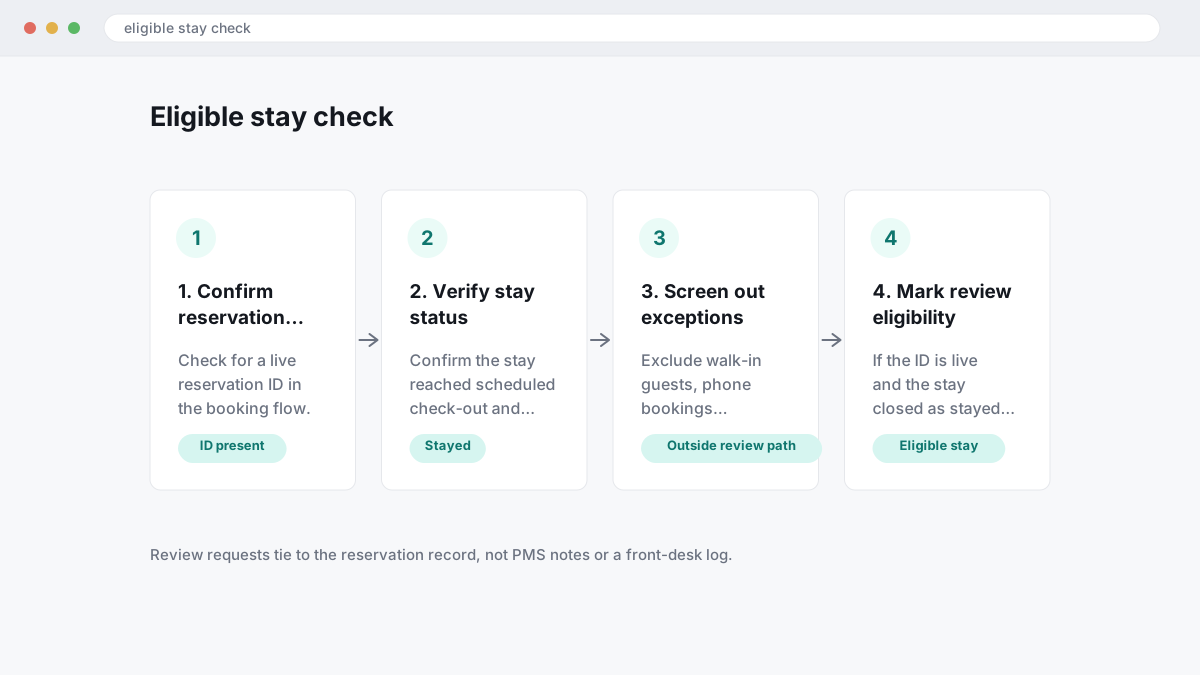
That is the core rule most property teams miss. A walk-in guest, a direct booking taken by phone, or a stay moved fully off-platform usually does not create the standard Booking.com review path, because the review request ties back to the Booking.com reservation record rather than your PMS notes or front-desk log. The practical check is simple: if the reservation has a live Booking.com ID and the stay closed as stayed, review eligibility is usually intact.
Cancelled no-shows and duplicate reservations usually sit outside normal eligibility. If a guest books twice for the same dates, uses one booking, then leaves feedback against the other, that is the kind of mismatch worth disputing. Group bookings create another grey area, especially when one organiser books several rooms under one account, because the reviewer may not be the person who slept in the room.
Relocations and chargebacks create the messiest disputes. If you moved a guest to another property after an overbooking, or the cardholder later reversed the charge, Booking.com may still treat the original reservation as the anchor record unless the file shows who stayed, where they stayed, and how the booking closed.
How Booking.com calculates and displays review scores
Booking.com displays a property review score as a platform-calculated overall mark alongside category ratings, and that headline number does not always match a simple average you would get from adding visible scores and dividing by the count.
The public listing still centres on a 1-10 property score, while guests also see category ratings such as cleanliness, comfort, location, facilities, staff, value for money and free WiFi where that category applies. The key operator point is simple: Booking.com’s displayed score comes from its own review model, not from you exporting the visible category boxes into a spreadsheet. At BGR Review, this is one of the first checks we make before advising whether a score drop came from a few weak stays or from confusion about how the platform presents ratings.
Most guides miss the rounding issue. Booking.com can show a rounded headline score on the property page while the underlying rating data sits slightly above or below that visible figure, so a property showing 8.1 may not be sitting on an exact 8.10 in raw terms. In the 2026 display refresh, the scale stayed guest-friendly and compact, but the presentation of category breakdowns became more prominent, which makes score movement look bigger even when the underlying shift is small.
If you are auditing reputation work, compare the displayed overall score, the category mix and the recency of the latest stays before you treat the page as a straight arithmetic average problem. That saves time. It also stops you disputing reviews that are hurting perception without breaching any Booking.com rule.
What Booking.com moderates before and after publication
Booking.com moderates review content both before it goes live and after publication, using automated checks first and manual review when a post trips a policy signal or gets reported later.
The main triggers are straightforward. Booking.com’s content rules bar hate speech, threats, impersonation, and personal data, so reviews that name a private phone number, email address, passport detail, or another guest’s identity can be stopped or removed. The same applies to reviews that disclose individual staff names where the comment turns into a complaint about a named employee rather than the stay itself. Publication timing can change here: some reviews appear quickly after checkout, while others sit longer because automated screening pushes them into a manual queue.
Most property-side confusion comes from content that feels relevant to the guest but fails moderation anyway. Booking.com can remove reviews for irrelevance, promotional copy, or advertising language, including posts that push another hotel, tour company, transfer service, or external website. A common weak point in the workflow is assuming a live review has already “passed” permanently. It has only passed the first check. If a later report points to personal data, impersonation, threats, or off-topic advertising, Booking.com can still review it again and take it down after publication.
What businesses can respond to and where the workflow lives
Booking.com review replies usually live in the property’s Partner Hub or Extranet review-management area, and the window that matters most is the first few days after publication.
If you manage a hotel, apartment or guesthouse, you will normally handle public responses inside the reviews section of the Partner Hub or the legacy Extranet, not through a separate consumer-support inbox. The practical job is simple: check the published text, match it to the reservation record, and draft a reply that deals with the factual point raised. Leaving a review unanswered for a week rarely helps, because the reply is there to steady future bookers while the complaint is still fresh.
A useful response does three things. It addresses the specific fact, adds remedy context such as a refund, room move or maintenance fix where that happened, and avoids exposing guest data in public. That means no booking numbers, no full names, no email trails, and no details that confirm protected stay information beyond what the guest already wrote.
Most weak replies fail because they argue about motive instead of record. If the guest says the room was cold, answer with the heating check, the date the issue was logged, and what your team offered on site. Keep it short, factual and readable enough that a new guest can scan it in under a minute.
When a Booking.com review can be disputed
A Booking.com review is worth disputing when you can point to a rule-based defect, because moderation decisions usually turn on policy fit rather than whether the comment feels unfair. A one-star stay review that says “staff were rude” is usually weak grounds on its own. A review attached to the wrong property, a demand for a refund in exchange for changing the score, a factual claim you can disprove, or content from someone who did not complete an eligible stay gives you a much stronger basis to challenge it.
Most operators waste time arguing sentiment. What helps is showing a concrete mismatch between the review and the booking record: the guest names do not match, the reservation was cancelled before check-in, the complaint describes facilities your property does not have, or the review alleges a police incident, chargeback, pest issue or room type error that your records contradict. If you escalate this with outside help, our own removal model is pay after success at $449 per removed review link with $0 upfront, which only makes sense when the dispute ground is specific enough to prove.
Country and platform rules still matter. Undisclosed paid endorsements can trigger issues under the US FTC’s endorsement rules, misleading commercial practices can raise UK and EU consumer-protection concerns, and false factual allegations may overlap with defamation law depending on jurisdiction, but that does not mean Booking.com will remove the review on a legal argument alone. This is general information, not legal advice. If the post is simply harsh but tied to a real stay, you are usually better off preparing evidence for the platform route or writing a measured public response than pushing a weak removal request.
What Booking.com review response template works without sounding scripted?
A strong Booking.com review response template is short and specific: thank the guest, acknowledge the concern, state the fix, and invite offline follow-up. Keep public management responses under 100 words, because future guests skim them and generic apologies read like you ignored the issue.
Most copy-paste replies fail for one reason: they protect the property more than they answer the review. “We are sorry you felt this way” does nothing for subscores such as cleanliness, and it will not steady conversions if a guest is deciding between two similar listings. A better reply names one fix. If late check-in caused the complaint, say you clarified the arrival instructions in the confirmation message. If cleanliness slipped, say you retrained housekeeping and added a room-check before release.
Thank you for staying with us and for your feedback. We are sorry the room did not meet your expectations for cleanliness. We have already retrained the housekeeping team and added a supervisor check before check-in. If you are open to it, please contact us through the Booking.com message thread so we can review your stay details directly.
Use the template as a frame, then customise the middle line every time. If the review also looks fake or ineligible, a measured reply is still useful while you prepare evidence for a dispute; BGR Review handles removals on a pay-after-success basis at $449 per removed review link with $0 upfront.
What should you do in the first 24 hours after a bad Booking.com review?
In the first 24 hours, preserve the evidence, confirm the reservation history and pick the right route: reply, investigate or dispute. Fast triage matters because a slow public response hurts booking confidence, and missing screenshots from day one can weaken a later challenge.
The wrong move is the emotional reply you post five minutes after reading the review in the Booking.com partner dashboard. It fails because you commit to facts before checking reservation records, internal notes and message logs, and you can end up contradicting your own property policy or admitting a service failure that should be handled privately. Screenshot the review first, then save the reservation ID, stay dates, room type, guest messages, check-in notes and any housekeeping or front-desk records tied to that booking.
Then sort the complaint into one of three buckets. If the guest is describing a real service failure, public management responses and private outreach usually protect conversions better than a weak dispute. If the review points to a policy issue, such as a fees or cancellation argument, check what the guest was shown at booking. If it looks fake or ineligible, build the evidence pack before you file. In BGR Review's log of 12,000+ negative review cases from June 2025 to June 2026, reviews raised within 28 days and backed by a clear policy issue resolved successfully in roughly 90% of cases; after 28 days, the observed success rate fell to approximately 25–30%.
Can fake or ineligible Booking.com reviews be removed, and what proof matters most?
Some Booking.com reviews can be removed, but the bar is eligibility and policy, not whether the comment feels harsh. The strongest disputes tie the review to missing or broken reservation links, mismatched stay details, and a dated record showing why the post is fake or ineligible.
The wrong approach is “this review is unfair” or “the guest exaggerated”. That usually fails because Booking.com reviews come from a verified-stay system, so partner-side disputes are narrower than what many owners expect after dealing with Google reviews, where open-public posting creates a different fake-review risk. The right approach is policy-grounded: show that the reviewer did not complete the stay tied to the reservation, reviewed the wrong property, posted content unrelated to the booking, or cannot be matched to a verifiable reservation in your Partner Dashboard records.
Strong review dispute evidence is simple and specific: reservation records, check-in and check-out timestamps, cancellation timing, room or unit allocation, and message logs that show what was actually discussed before, during, or after the stay. If the review mentions a late check-in, missing amenity or refund dispute, your evidence pack should match that point line by line rather than dumping screenshots. Across 12,000+ negative review cases logged by BGR Review from June 2025 to June 2026, roughly 90% of businesses who came to us after a failed first attempt had used only the basic in-platform report button with no supporting documentation, and 70–80% of those initial requests had been rejected.
If you cannot prove ineligibility or a policy breach, a public management response is often the smarter move than chasing removal. com may leave up a review that is unfair but still eligible.
What actually happens after you dispute a Booking.com review?
After you dispute a Booking.com review, the platform usually checks the booking link, the policy reason you gave and the documents you attached before it decides anything. Clear dates, a booking ID and review dispute evidence usually carry more weight than a long complaint.
The wrong approach is the one-click removal expectation: you hit report, write that the review is “fake”, and wait for it to disappear. That fails because moderation checks platform rules, not frustration, and Booking.com will usually look for one clear policy ground tied to a verified stay, eligibility issue or another documented mismatch. Submit one case only, with the reservation number, check-in and check-out dates, guest name as held in your system, screenshots from the partner dashboard and a short note showing where the review conflicts with the booking record or current platform policy changes.
Then you wait for moderation or a follow-up request through the available appeal routes in the partner dashboard or partner support channel. The likely outcomes are simple: removal, no action, or a request for more documentation. Across 12,000+ negative review cases logged by BGR Review from June 2025 to June 2026, roughly 90% of businesses who came to us after a failed self-filed attempt had used only the basic in-platform report button, and 70–80% of those initial requests had been rejected. A rejection does not prove the review is valid. It usually means the file was too thin.
How do Booking.com reviews compare with Google reviews when trust and control matter most?
Booking.com reviews usually carry more trust on stay authenticity because they come from verified stay reviews tied to a completed reservation. Google reviews usually carry more discoverability because they influence branded search, the local pack and map-pack click-through, but owners get less certainty that every reviewer actually stayed with them.
The comparison is easier to make side by side.
| Platform | What readers trust most | What owners control most |
|---|---|---|
| Booking.com | Verified stay reviews after checkout, which makes the guest review score feel closer to actual guest experience | Less control over review acquisition and narrower removal options; disputes usually turn on eligibility or a clear policy breach in the partner dashboard |
| Broader social proof because volume builds faster and shows up across Search and Maps | More familiar public management responses, easier request flows, and more day-to-day visibility impact on discovery |
The wrong approach is to treat this as a straight Google reviews comparison and pour all effort into one channel. com trust drives booking-page conversion, while Google often drives the first click through branded search or the local pack. com looks at review eligibility and reservation linkage, while Google applies its Google Business Profile review policy differently.
Which fixes should owners prioritize first if bookings dip after review changes?
Start with the smallest high-impact gap: stale recent reviews, unresolved cleanliness complaints, or slow public replies. You usually recover bookings faster by fixing the visible friction in the last few reviews than by trying to lift the headline score a fraction.
The wrong move is score chasing. Owners fixate on the overall guest review score, push for nicer wording in responses, and ignore the complaints that actually stop conversions: dirty bathrooms, poor room turnaround, missed messages before check-in. com, travellers read the newest comments and the subscores for cleanliness and location before they book, so a polished reply cannot offset three fresh complaints about housekeeping.
If your recent review recency lags the set you compete with, close that gap first. A property with older feedback usually loses click-through and bookings even when its average score still looks acceptable, because the listing feels less current. Then open the Booking.com partner dashboard, pull the feedback trends, and pick one operational fix for the next 30 days: housekeeping checks, response speed, or pre-arrival messaging. One fix, one month, then recheck the wording in new reviews and the subscores before you change anything else.
Where to go from here
Start with a simple split in your Booking.com partner dashboard: reviews you can answer publicly, and reviews you may be able to dispute. Answer the first group quickly, especially recent comments that mention cleanliness, location, check-in or staff, because those subscores shape booking decisions before a guest ever reaches your direct site or branded search. Pull the second group into an evidence folder straight away: reservation record, message thread, check-in data, house rules, photos, and any mismatch that suggests an ineligible or false review. Speed matters. Across 12,000+ negative review cases logged by BGR Review between June 2025 and June 2026, reviews raised within 28 days and backed by a clear policy issue resolved successfully far more often than older cases.
If the review is harsh but eligible, write the response and move on. If the facts do not line up, go to the relevant removal or review-management service page next so you can choose the right route before recency starts hurting conversions.