

Quick answer
To dispute a Google review, report it through your Google Business Profile and choose the Google Business Profile Prohibited and Restricted Content category that matches the review exactly. Google usually leaves up negative opinions and low star ratings unless the post breaks a policy such as spam, off-topic content, impersonation, harassment, or false factual claims. The strongest disputes include proof like order records, CRM checks, staff rota gaps, CCTV timing, duplicate text, or evidence the reviewer was never at the location. If Google rejects the first report, move to the Reviews Management Tool and support escalation instead of flagging the same review again.
We handle review disputes as a live process, not a theory exercise, and that changes the advice. Across 12,000+ negative review cases logged June 2025 to June 2026, one pattern kept repeating: the first report often fails because the business picked the wrong policy reason, even when the review looked obviously fake.
If you want to know how to dispute a Google review properly, the useful part is the evidence pack and the escalation path after rejection. We also sell removal support, so the line is simple: use DIY reporting first when the breach is clear, and only escalate externally when Google support stalls or the reviewer details need tighter proof.
What disputing a Google review can and cannot do
Disputing a Google review can remove content that breaks the Google Business Profile review policy, but it does not erase a bad opinion simply because it hurts your rating. A plain 1-star review often stays if it reads as customer opinion and does not include prohibited content such as spam, impersonation, harassment, conflicts of interest, or content unrelated to a real experience. That is the point most agency guides blur. “Awful service” is usually treated differently from a fake booking reference, a competitor post, or a review aimed at the wrong business.
Your dispute can also end with no action after Google’s initial review, even when the review looks obviously wrong to you. Across 12,000+ negative review cases logged by BGR Review between June 2025 and June 2026, roughly 90% of businesses that came to us after a failed attempt had used only the basic in-platform report button, and 70–80% of those first requests had been rejected. A rejection did not prove the review was legitimate. It usually meant the policy ground was weak, the category was mismatched, or Google had too little evidence to act.
Which Google review violations are most likely to be removed
Google removes reviews most reliably when they match a named Google Business Profile review-policy category such as fake engagement, spam, impersonation, harassment, or hate content.
The strongest grounds are the ones Google can treat as platform abuse rather than opinion. Fake engagement covers bought, incentivised, or coordinated review activity; spam covers repeated text, mass posting, and irrelevant promotional content; impersonation covers a reviewer pretending to be a customer, staff member, or another person. Those categories usually give a cleaner path than “this review is unfair”, which Google often treats as a customer-service dispute and leaves live. That is why BGR Review only takes removal work on a pay-after-success basis at $449 per removed review link when there is a policy angle to argue, not simple dissatisfaction.
| Review type | Removal chance | Why |
|---|---|---|
| Fake engagement, spam, impersonation | Usually stronger | They map directly to named Google policy triggers |
| Off-topic review about another business or branch | Often workable | Google can remove content that is irrelevant to the profile being reviewed |
| Negative but genuine experience | Usually weak | Google generally allows criticism, even when it hurts |
Off-topic reviews get missed because they can look real at first glance. A one-star post about a delivery issue may still breach policy if your listing is for the retail shop and the reviewer is describing a different branch, a marketplace seller, or another company with a similar name. Profanity alone often stays up. Abuse with threats, targeted harassment, or hate content has clearer triggers under Google’s prohibited content rules, so the category you choose matters more than how offensive the wording feels.
Fake, off-topic, defamatory, or negative: classify the review first
You need to classify the review before you dispute it, because Google removes policy breaches, not reviews that simply feel unfair.
Across 12,000+ negative review cases logged by BGR Review between June 2025 and June 2026, a large share of rejected first attempts arrived with the wrong label attached to the problem. A fake review usually means no real transaction, booking, visit, delivery, or customer record exists. An off-topic review can come from a real person and still breach Google's review policy if it talks about politics, a staff member's appearance, or another company instead of the service you actually provided.
| Type | What it usually looks like | What proves it |
|---|---|---|
| Fake | No matching order, appointment, CRM entry, call log, or site visit | Order records, booking system search, CRM lookup, staff rota |
| Off-topic | Politics, personal insults, comments about appearance, or complaints about a different business | Screenshot of the text plus proof of what service was actually delivered |
| Defamatory | False factual claim such as “they stole my deposit” or “they forged paperwork” | Contracts, invoices, message history, refund trail, legal correspondence |
| Negative but allowed | Rude, harsh, or one-sided opinion about a real experience | Usually no removal ground under Google's policy |
Defamation sits in a different lane. Google may leave a review live unless the statement clearly breaches its policy or you use its legal request route, and the legal standard changes by country. In the US, false statements of fact can trigger defamation issues; in the UK, defamation and consumer-protection rules differ again, including the DMCC Act framework on fake or misleading reviews. This is general information, not legal advice.
The evidence pack that gives a dispute its best chance
A strong Google review dispute is a dated evidence pack that ties the review to a specific policy issue and shows, with records, why the account of the visit or transaction does not fit your business data.
Start with a date match. Take the review posting date and compare it against your CRM, booking system, invoices, payment records and call logs for the same name, initials or claimed service. If nothing matches, note that plainly. If the reviewer says they visited at 7:30 pm, add the staff rota and any CCTV timing that shows whether you were closed, fully booked, or had no such customer on site. Across 12,000+ negative review cases logged by BGR Review from June 2025 to June 2026, reviews raised within 28 days and backed by an identifiable policy issue resolved successfully in roughly 90% of cases; beyond 28 days, the observed success rate fell to approximately 25–30%.
- Screenshots of the live review showing the profile name, full review text, star rating and the business listing URL.
- Your internal record check: CRM lookup, booking history, invoice search and call-log result for the review date.
- A short chronology with the posting date, the date you flagged it, the Google case ID, and each follow-up date.
Most weak disputes fail because the evidence does not match the policy category. A review can look obviously fake and still get rejected if you file it as “disagreement” instead of impersonation, fake engagement, off-topic content or a factual claim you can document. In BGR Review’s own case file, roughly 90% of businesses who came to us after a failed attempt had used only the basic in-platform report button with no supporting documentation.
How to flag a Google review in Google Search and Maps
Flag a Google review from Google Search, Google Maps, or your Business Profile dashboard by opening the review, selecting Report review, and filing it under the closest Google Business Profile review policy reason.
Use the interface you can access fastest, but keep the wording and policy category consistent across all of them. If the review looks fake because you cannot match the name, do not file it as “disagreement” or a generic complaint. Pick the nearest policy ground, such as spam, off-topic content, conflict of interest, or harassment. A loose category weakens the record if you need to appeal later, even when the review itself looks obviously false.
Google can then push the case into the Reviews Management Tool flow and ask for more detail. That usually means a follow-up case record rather than an instant decision in Maps. In BGR Review’s dataset of negative review cases with prior self-filed attempts, roughly 90% had used only the basic report button with no supporting documentation, and 70–80% of those initial requests were rejected. A rejection does not prove the review is genuine. It often means the first flag was too thin.
How the Reviews Management Tool and appeal process actually works
The Reviews Management Tool is Google Business Profile’s dashboard for submitted review reports, where you track each flagged review and, if Google allows it, file a formal appeal.
After you flag a review in Search or Maps, the case usually appears there under your Business Profile, tied to the specific review URL and the policy category you chose. That detail matters more than most guides admit. If you pick the wrong ground under Google’s Business Profile review policy, a strong fake-review case can still fail because the submission does not match the evidence. The form is usually built around three basics: the affected profile, the review link, and the selected violation.
A rejection is not always the end of the process. Google may allow one appeal, and the better approach is to narrow the claim rather than pile on every possible accusation. “Reviewer never visited, no matching order, no staff contact, no booking on that date” is stronger than “fake, defamatory, spam, competitor, harassment” all at once. In BGR Review’s own case file, across 12,000+ negative review cases logged June 2025 to June 2026, roughly 90% of businesses who came to us after a failed attempt had used only the basic in-platform report button with no supporting documentation.
Use the appeal to make the evidence readable. Add the CRM lookup, order check, rota gap, or CCTV timing that matches the review date, then tie that proof to one policy reason. If Google has already decided the review is allowed opinion, repeating the same wording rarely changes the outcome.
What to do after a rejection: tighten the claim, then escalate
A rejected Google review dispute usually needs a narrower policy claim and a stronger evidence pack before you escalate it.
Most failed appeals collapse because the report throws five weak arguments at Google instead of proving one breach under the Google Business Profile review policy. Pick the single category your evidence can actually support: spam and fake engagement, off-topic content, conflict of interest, or a factual identity issue such as “this person never had a transaction with us”. In BGR Review’s own case file, roughly 90% of businesses that came to us after a failed attempt had used only the basic report button with no documents attached, and 70–80% of those first requests had been rejected.
If you are re-filing, rebuild the claim around missing proof. Add order records, a CRM lookup, staff rota, booking logs, delivery records, or CCTV timing that shows no matching visit at the stated time. This is where most DIY disputes go wrong: the review looks obviously fake to you, but the policy category does not match the proof. “Fake” without a policy fit often loses. “No customer record exists for the named date, staff member and service” gives Google something it can assess.
| Escalation route | Best used for | What to send |
|---|---|---|
| GBP support | Rejected flag with clear policy breach | One-sentence claim plus evidence pack |
| Google Business Profile community forum | Stalled cases needing product expert review | Timeline, review link, rejection history |
| Legal removal request | Defamation, impersonation, court-order scenarios | Specific false statement and legal basis |
Time matters. Across 12,000+ negative review cases logged by BGR Review, reviews raised within 28 days of posting and backed by an identifiable policy issue resolved successfully in roughly 90% of cases, while comparable cases raised after 28 days fell to approximately 25–30%. If the review states false facts that could trigger a legal claim, that moves into a different route; laws vary by country, platform rules still apply, and this is general information rather than legal advice.
When a legal removal request may be the better route
A legal removal request is the better route when the review turns on false statements of fact, regulatory breach, or identifiable harm that Google’s standard policy categories do not squarely cover.
A review that says you “stole a deposit”, “sold counterfeit parts”, or “treated a patient without a licence” may fit defamation or injurious falsehood more closely than a normal Google Business Profile policy dispute. Google can remove some content under its prohibited and restricted content rules, but a review can look obviously false and still fail if you file it as spam instead of presenting the legal issue properly. That is one reason BGR Review keeps legal-route cases separate from our pay-after-success removal model of $0 upfront and $449 per removed review link.
In the United States, undisclosed paid endorsements can also raise FTC endorsement rule issues, especially if a competitor, affiliate, or influencer posted praise without disclosure. In the UK and EU, misleading commercial practices rules can matter too, including the UK’s DMCC Act framework and wider consumer-protection rules against fake or manipulated reviews. Laws and platform rules vary by country, and this is general information rather than legal advice. If the review alleges a concrete fact and you can prove it false, get legal advice before filing the wrong category.
A practical dispute workflow from first flag to final outcome
A workable Google review dispute flow is simple on paper: classify the review against the Google Business Profile review policy, save proof before anything changes, then submit one precise flag that matches the violation.
| Timing | What to do | What usually decides the result |
|---|---|---|
| Day 1 | Decide whether the review is fake, off-topic, harassment, conflict of interest, or another named policy issue. Save screenshots, the review URL, order records, CRM lookup, staff rota, and CCTV timing if the reviewer claims an in-person visit. | Wrong category kills good cases. A “fake” review filed under the wrong policy bucket often gets rejected even when no customer record exists. |
| Day 3-7 | Check the status in Google’s Reviews Management Tool. If nothing changed, tighten the policy basis and prepare appeal materials in one pack. | Across 12,000+ negative review cases logged by BGR Review, reviews raised within 28 days and backed by an identifiable policy issue resolved successfully in roughly 90% of cases. |
| Final outcome | Google usually lands on removal, no action, or account-level review of the reviewer if broader spam signals appear. | A rejection is not proof the review is legitimate. In our case file, roughly 90% of businesses who came to us after failing had only used the basic report button with no supporting documents. |
When DIY flagging is enough and when outside help makes sense
DIY flagging is enough for a single review that clearly breaches Google Business Profile review policy and can be disproved with one clean record check.
| Situation | Best first move |
|---|---|
| One obvious spam review, no matching customer record, recent posting | Use the in-platform report flow first and keep your order log or CRM lookup ready if Google asks for context. |
| Several locations hit at once, staff impersonation, or a burst of fake reviews | Build a stricter pack before you file: location list, timestamps, reviewer overlap, rota checks, and any linked accounts or wording patterns. |
| Review alleges theft, fraud, assault, contamination, or serious safety failure | Get legal review early. Country and platform rules differ, and this is general information rather than legal advice. |
Google often rejects weak reports because the policy category and the evidence do not match. In BGR Review’s own case file of 12,000+ negative review cases, reviews raised within 28 days and tied to an identifiable policy issue resolved successfully in roughly 90% of cases, while comparable cases raised later fell to approximately 25–30%.
If you need outside help, use it for documentation and escalation, not because every bad review is removable.
How to reduce future dispute volume without violating review rules
Reducing future dispute volume means building a review process that brings in more legitimate feedback while giving Google Business Profile fewer reasons to question how those reviews were collected.
Ask every real customer in a consistent way, after the service is complete, instead of only asking your happiest ones or only asking after a complaint is fixed. Uneven solicitation can make a profile look manipulated even when the reviews come from real people. Keep the request simple, use the same message across staff, and log who was asked so each location follows one process rather than improvising.
Do not offer discounts, gifts, refunds, or staff pressure in exchange for reviews. Google’s fake engagement rules treat incentivised or coerced reviews as a policy problem, and that can create a bigger mess than the original dispute. If you use outside help, keep it compliant: BGR Review’s review packages focus on verified reviews and include a 30-day free replacement guarantee, not incentives.
Reply briefly to suspicious reviews, save the evidence, and review recurring names or wording once a month across all locations. A monthly check catches repeat reviewers, copied phrasing, and location-hopping accounts early, before you end up disputing the same pattern one by one.
How do multi-location businesses handle branch mix-ups and repeated complaint patterns?
Multi-location disputes land better when you can show the reviewer hit the wrong branch, wrong city or wrong staff member, or pasted the same complaint across several listings. For these cases, branch-level records carry more weight than a head-office statement inside your Google Business Profile.
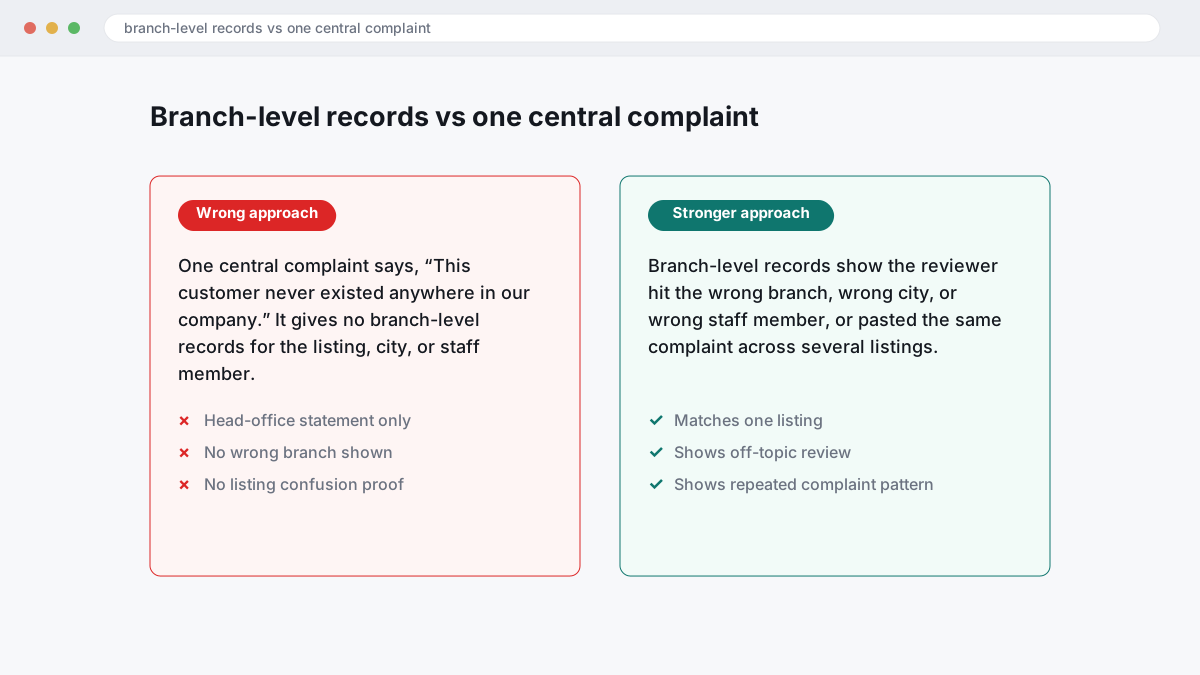
The wrong approach is sending one central complaint that says, “This customer never existed anywhere in our company.” That usually fails because Google needs something verifiable against one listing under the Google Maps user-contributed content policy, often as an off-topic review or clear listing confusion. Across 12,000+ negative review cases logged by BGR Review from June 2025 to June 2026, roughly 90% of businesses that came to us after a failed attempt had used only the basic in-platform report button, with no supporting documentation, and 70–80% of those initial requests had been rejected.
The better route is branch-specific location proof sent in a tight evidence pack: the receipt log for that site, staff rota for the named employee, service radius if the branch does not cover that postcode, and dated exterior photos if the reviewer describes the wrong entrance or unit. If the same wording appears on two or three branches, point out the duplicated complaint pattern and match each post to the locations it could not have involved. That gives support something they can check quickly, which is the difference between a stalled flag and a usable appeal.
Where to go from here
Start with the platform route. Flag the review inside your Google Business Profile, choose the closest policy reason under Google's Business Profile review rules, and build a dated evidence pack the same day: order records, CRM lookup, staff rota, CCTV timing, screenshots of the review, and any message trail that shows the person was never a customer or that the claim is factually wrong. Then wait for Google's first review. If the category is wrong, the request often fails even where the review looks obviously fake.
If the review stays live after that first decision, escalate with the same evidence organised in one place and tied to the exact policy breach. Expect a second look at the documentation, not a debate about whether the review feels unfair. Google will usually leave up genuine negative opinion. It may act where the review is fake, off-topic, impersonating someone, or includes prohibited content.
If you have a clear breach and a rejection anyway, specialist help makes sense.