

Quick answer
A DMCA notice to Google can get copyrighted material delisted from Google Search, but that usually leaves the file or page live on the site hosting it. You file through Google's Legal Removal Requests form, name the original work, and list each infringing URL precisely rather than dropping in a homepage or category page. The notice also requires good-faith and accuracy statements made under penalty of perjury. If Google accepts it, the URL can disappear from Search and the complaint may be logged in the Lumen Database. Rejections usually come from weak ownership proof, the wrong URLs, or complaints that are really defamation or impersonation claims.
We handle removal work every day at BGR Review, including pay-after-success negative review removals at $449 per removed link with $0 upfront, and the same evidence habits matter here: the field that swings outcomes is usually the exact infringing URL list, not the narrative box. The failed filings we see most often mash copyright, defamation and impersonation into one complaint, attach screenshots with no ownership trail, and point Google to a homepage instead of the copied image, text block or cached result.
This page fixes that gap. It stays on Google's actual workflow, what search delisting changes for click-through rate and branded search demand, and when you need a different route because a copyright claim will not touch the source page or help your map pack visibility.
Do you need Google to delist the result, or the website to remove the file?
A Google DMCA request usually affects search visibility, not the underlying file on another site. If the copied material sits on a third-party server, the cleanest full fix usually pairs a Google Search delisting request with a complaint to the host or site owner that controls the source page.
Most generic guides explain the statute and stop there. The practical mistake is assuming Google can delete a file from a website it does not host, so you file one notice, the result drops from Search if accepted, and the copied page still loads, still gets shared directly, and can still depress click-through rate and conversions when people find the brand through other routes.
This split matters because search delisting vs source-page removal are different jobs handled by different parties. Google Search can remove a URL from search results; the host controls the actual file, image, PDF or article on the source page. If the content is hosted inside a Google product, the route changes again, because Google Search vs other Google products are separate systems with separate forms and review teams.
The distinction is easier to see side by side.
| Where the copy sits | Who you complain to | What outcome you can expect |
|---|---|---|
| A third-party website | Google Legal Removal Requests form plus the site owner or hosting provider | Search delisting from Google, and separate source-page removal if the host acts |
| Blogger, Drive or YouTube | The product-specific Google process for that hosted content | Action inside that product, which may remove or restrict the file itself |
If you need the copy gone everywhere, file at both levels at the start. If you only need the page out of branded search demand fast, Google Search may be enough for the immediate visibility problem, but it will not erase the source file from the web.
Is a DMCA the fastest first move, or should you switch routes immediately?
File a copyright notice first when you can identify a specific work you own and match it to exact infringing URLs. If the problem is false accusations, impersonation, or hidden sponsorship, a different route is usually faster and easier to defend.
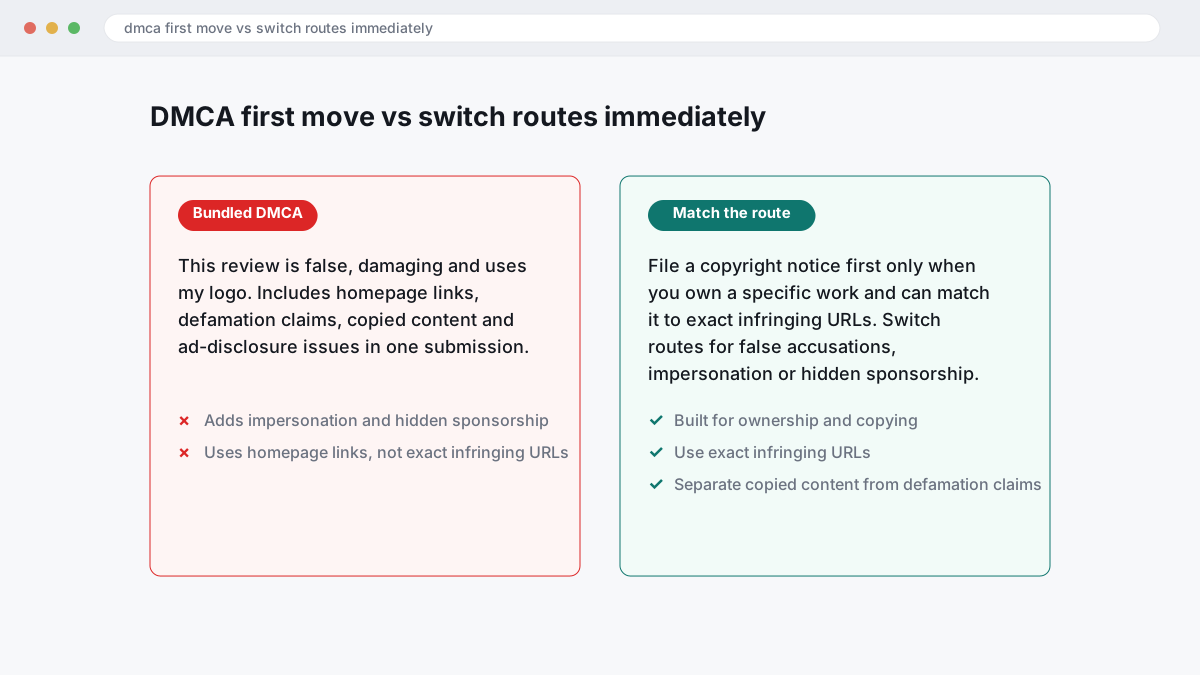
The wrong move is to bundle copied content, defamation claims and ad-disclosure issues into one DMCA submission. Google’s copyright process is built for ownership and copying, so a complaint that says “this review is false, damaging and uses my logo” often fails because only one part belongs in that form, and homepage links instead of proper infringing URL identification make it weaker again. In BGR Review’s case file of 12,000+ negative review cases logged June 2025 to June 2026, roughly 90% of businesses who came to us after a failed attempt had relied on minimal in-platform reporting, and 70–80% of those initial requests had been rejected.
This is the cleaner split to use when speed matters for branded search, click-through rate and map-pack trust:
| Problem | Wrong first move | Better route |
|---|---|---|
| Copied text, image or video at a specific URL | Arguing harm in general terms | DMCA with the source work and exact infringing URL |
| False factual allegation | Filing copyright paperwork | Defamation claims review, usually with legal support |
| Paid praise with no disclosure | Calling it theft of content | Platform policy report and the FTC endorsement guides |
That route split works because each system tests a different question. Copyright asks who owns the work; defamation asks whether a false statement caused harm under the law in your country; endorsement enforcement asks whether sponsorship was disclosed under platform rules and, in the US, the FTC endorsement guides. If your goal is higher conversions from your brand search and less damage in the local pack, the fastest first move is usually the route that matches the violation exactly.
What proof actually makes Google believe you own the work?
Google believes evidence it can verify quickly, not a bare claim that you created the work. The strongest DMCA notices connect the original publication to the copied URL with clear ownership details, publication timing, and side-by-side proof a reviewer can check in minutes through the Google Legal Removal Requests form.
The weak approach says “this content is mine” and drops a homepage link. That usually fails because the reviewer cannot match one specific work to one specific infringement, cannot see whether any licensing was granted, and cannot confirm who owns the copyright from the materials provided. Across 12,000+ negative review cases logged by BGR Review from June 2025 to June 2026, roughly 90% of businesses that came to us after a failed attempt had filed with minimal supporting evidence, and 70–80% of those initial requests had been rejected; that is our observed outcome profile, not a Google rule.
The stronger approach is mechanical. Put the original URL beside the copied URL, then add screenshots showing the same text, image, video frame, layout, or downloadable file on both pages. Include the original publication date if you have it, the licensing terms that apply if the work was ever reused with permission, and any registration details if they exist. Name the copyright owner exactly as the form, the website footer, the registration record, and the source files show it. “Bright Green Roofing Ltd” in one place and “BGR Roofing” in another creates avoidable doubt, which is where clean copyright ownership evidence usually wins or loses.
Which URLs should you list so the request does not fail on a technicality?
Use exact URLs, not site names, root domains or a homepage. Google reviewers need the original source URL for each work and the precise infringing URL for each copied page, because the same asset often appears on duplicate copies, cached results and mirror paths.
The wrong approach is to accuse example.com as a whole and paste one broad link into the Google Legal Removal Requests form. That fails because infringing URL identification is page-level: Google reviews the location where the copied text, image or file appears, not a domain-wide complaint. If your original article sits at one URL and the copied version appears on three parameter variants, two print pages and a Google-cached result, list all six separately and pair each one with the original URL it copied.
The cleaner approach is a one-to-one map. In BGR Review's own case intake, the failed submissions that come in first are often the same mess: one notice, homepage URLs, mixed claims, then a rejection. The resubmission that works is tighter: original page URL, each infringing page URL, any duplicate copies on separate paths, and any cached results entered as their own entries where Google still shows them in Search.
Which Google form should you use, and what belongs in each field?
For Google Search, file through the Google Legal Removal Requests form and complete every copyright field exactly. Google wants your contact details, a description of the work, each infringing URL, the name of the copyright owner, and the required sworn statements under penalty of perjury.
A careful notice usually takes 10 to 20 minutes to prepare because Google reviews the form field by field, not as a free-form complaint. The wrong approach is emailing Google Legal with a homepage link, a short note saying “they stole our content”, and a mix of copyright, defamation and impersonation in one message; that usually fails because the reviewer cannot match the claim to a specific Search result or a specific legal basis. In BGR Review’s dataset of negative review cases with prior self-filed attempts, logged June 2025 to June 2026, roughly 90% had used only a basic platform report with no supporting documentation, and 70–80% of those initial requests were rejected.
These are the fields that decide whether Google can process the notice.
| Form field | What belongs there |
|---|---|
| Your details | Use the legal name and contact details of the claimant or authorised agent, consistent across the notice. |
| Copyrighted work | Identify the original article, image, video or page clearly, with the source URL if available. |
| Infringing URLs | Paste each exact result or page URL separately, never just the site homepage or domain root. |
| Ownership and authority | State who owns the work and, if you are filing for a company, your authority to act for that owner. |
| Sworn statements | Complete Google’s good-faith and accuracy declarations exactly, then sign with your full legal name. |
The right approach is a complete notice inside Google’s own form, with one legal theory, exact URLs, and ownership evidence that matches the work you say was copied. That works better because Google can route Search copyright complaints through its standard review flow, log the notice for possible publication in the Lumen Database, and assess the claim without guessing what page, file or rights holder you mean.
What wording can you adapt without weakening the legal statements?
A usable Google DMCA template is a fill-in structure for facts, URLs and ownership details, while the legal declarations stay unchanged. The safest draft helps you organise evidence for the Google Legal Removal Requests form; it does not inflate infringement, rewrite sworn statements or guess at rights you cannot prove.
The wrong approach is treating a template as a legal shortcut: “they stole our content”, a homepage URL, and a copied declaration with no copyright ownership evidence attached. That fails because Google checks the exact field-level facts, including the original work, the infringing URL and the owner name, before it relies on your statements made under penalty of perjury. The better approach is to adapt only the factual parts: your legal name or company name, a precise work description, the original source URL, each infringing URL, and any registration, publication record or licence trail that proves ownership. Leave Google’s good-faith and accuracy wording intact. If you later escalate a failed filing to BGR Review, our $0 upfront, $449 per removed link model still starts with that same evidence pack, not a smarter template.
How is copyright different from defamation when you want Google to act?
Copyright and defamation deal with different harms. A DMCA notice asks Google to delist unauthorised copying of protected expression, while defamation claims deal with false statements presented as fact; if you file the wrong route first, you lose time and muddy the cleaner complaint.
The wrong approach is common: you see a page accusing your company of fraud, attach your logo screenshot, and send one blended complaint through Google's legal forms. It usually fails because the copied logo is a copyright point, but the accusation itself is a reputational dispute about false statements. A stolen product photo, brochure text, or article paragraph can support a copyright request to Google Search; a false accusation that hurts your click-through rate, conversions, or branded search demand usually needs a separate legal strategy aimed at defamation claims and, in some countries, direct publisher contact or court-backed process.
The cleaner approach is to split the routes. File copyright only for the exact copied asset and exact infringing URL, then handle the harmful falsehood through legal review on its own facts. That works because Google can assess ownership and copying under its copyright process, while defamation turns on truth, context, jurisdiction and evidence of harm — issues Google is far less willing to decide inside a standard webform.
Could fair use or a bad claim turn your notice into a problem?
Yes. A weak or knowingly false DMCA notice can create a problem, especially where fair use, commentary, criticism, or a short quotation is involved. Before you file with Google’s Legal Removal Requests form, check whether the use is transformative, limited, and tied to opinion rather than copying the core commercial value of your work.
The wrong approach is to treat every hostile page, blog post, or review-style article as infringement because it hurts branded search demand, click-through rate, or conversions. That fails when the page uses a small excerpt to comment on your business, criticise your service, or compare your claims, because fair use can apply in some contexts and Google will not treat a copyright form as a shortcut for defamation or reputation damage. A bad claim also carries misidentification risk: the wrong URL, the wrong image version, or the wrong owner name can turn a thin notice into a credibility problem, and knowingly material misrepresentations can create exposure under 17 U.S.C. § 512(f).
The better approach is narrower. If the page copied your full photo set, lifted product copy, or republishes hosted content without permission, make a clean infringement claim with exact file URLs and ownership evidence; if the page is mainly commentary, switch routes and assess defamation, impersonation, or platform-policy reporting instead. Rules vary by country and platform, including Google Search versus hosted products, so this is general information rather than legal advice.
What happens after submission if Google accepts, rejects, or publishes the notice?
After you submit a DMCA notice to Google, the usual outcomes are straightforward: Google may delist the specific URLs you listed from Google Search, reject the notice, or ask for clearer ownership or URL evidence. Many accepted notices also become visible through the Lumen Database, so a complaint you assumed was private can become public in outline even where Google applies privacy limits to some personal details.
The wrong approach is to treat the filing like a private message to Google and paste broad claims, homepage URLs, and side issues such as defamation or impersonation into one notice. That usually fails because Google reviews a copyright claim against the exact allegedly infringing URL, your ownership evidence, and whether the issue is actually copyright at all; when it rejects, the reason often comes back as missing URLs, ownership gaps, or a non-copyright dispute. At BGR Review, the cleaner resubmissions that move forward usually split the routes: one notice for copyright, separate reporting for impersonation or defamatory statements, and exact page or file URLs rather than category pages.
If Google accepts, expect search delisting for the listed results, not source-page removal from the host site. That distinction matters for transparency and for performance: the page can still exist, still be shared directly, and still affect branded search demand, click-through rate, and conversions if people reach it outside Search.
What should you do when Google rejects the request?
A rejection usually comes down to three defects: thin ownership proof, the wrong URLs, or the wrong legal basis. Fix the exact defect first, then decide whether to submit a corrected notice through the Google Legal Removal Requests form or move to the host, platform, or another legal route.
The wrong move is filing the same notice again with a longer complaint. Google usually rejects that for the same reason, because the form turns on evidence fields, not frustration. In BGR Review's records of negative review cases where a business had already tried on its own, across the period June 2025 to June 2026, roughly 90% had used only the basic in-platform report button with no supporting documentation, and 70-80% of those initial requests had been rejected; that is an observed case pattern, not a Google rule.
Read Google's reason line-by-line. If the issue is copyright ownership evidence, rebuild the pack before you refile: the original file, publication date, registration if you have one, source URL showing first publication, and a short statement linking you or your company to the work. If the issue is URL identification, replace homepage links with the exact infringing page URL and, where possible, the direct image or file URL that contains the copied material.
If Google is the wrong venue, switch quickly. Google can delist Search results, but it does not remove hosted content from the website itself, so a copied image on a host, marketplace, or forum often needs a complaint to that service first. If the real problem is defamation, impersonation, or a fake review rather than copyright, stop forcing a DMCA theory and use the platform policy route instead; that cleaner split usually gets you a faster answer than another defective filing.
What changes if the other side files a counter notice?
A counter notice means the other side is formally disputing your copyright claim, and the delisted result or content can be restored depending on the platform and what happens next. At that point, better evidence and the right forum matter more than sending the same complaint to Google again.
The wrong move is to treat an initial delisting as the end of the dispute. That fails because Google Search only controls whether a result appears in Search; it does not decide final ownership, and it does not remove the file from the source website unless Google is also the host for that content in a separate product workflow. If the target files a counter notice, you are now in a contested stage where restoration becomes a live risk, and the underlying dispute may need to move to the host, the platform that stores the file, or formal legal action rather than Search.
The right move is to split the problem. Keep your Search record clean with precise ownership evidence, dated originals, and the exact infringing URL, then deal separately with the host if you need the file gone at source. Repeating a mixed complaint about copyright, defamation and impersonation usually weakens the next step for the same reason many first submissions fail: the decision-maker cannot tell what rule you are actually invoking.
Repeat infringement matters more for platform accounts and hosted content than for Search indexing alone. A site, channel or account that keeps uploading the same work can face stronger platform consequences, while Google Search may simply process each notice and counter notice on its own record. If visibility is hurting click-through rate, branded search demand or map-pack conversions now, do not wait for the copyright dispute to settle before using the non-copyright removal route that actually fits the content.
How next practical step if you need visibility reduced now actually works
Start by matching each offending URL to the right route: Google Search delisting, a direct host complaint, or a product-specific Google report. If the issue blends copyright with false factual claims or undisclosed promotion, separate the legal basis before you file.
The wrong move is a one-form-fits-all complaint that throws in copyright, defamation and advertising breaches together, then pastes homepage URLs. Google Search only controls search delisting; it does not remove the source page, and other Google products use different forms and standards. A cleaner triage works faster because the reviewer can test one rule against one URL, while the host can assess source-page removal and an advertising regulator issue can be framed under the FTC endorsement guides if hidden sponsorship is part of the problem.
Use this route map before you submit anything.
| Target | Best first route | What to attach |
|---|---|---|
| Google Search result | Google Legal Removal Requests form | Exact infringing URL, search result URL, ownership proof, copied work location |
| Page still live on the site | Host or site operator complaint | Source-page URL, copied asset, publication date, ownership record |
| YouTube, Blogger or another Google product | Product-specific report | Product URL, account details, file ownership evidence |
If you need visibility reduced now, build a URL map, add ownership proof that predates the infringement, and file the fastest route first.
Where to go from here
Use a DMCA filing only when you can show copyright ownership, the exact infringing URL and copying that is clear enough to survive a fair use check. If your problem is a fake review, a false factual claim, an impersonation profile or another policy breach, switch routes before you waste another submission on Google’s Legal Removal Requests form. That is where a lot of rejections start: one mixed complaint, the wrong legal theory, and a homepage URL instead of the copied page.
Your next step is simple. Pull the exact URLs, save dated screenshots, gather ownership proof for the original work, and separate copyright from defamation, impersonation and platform-policy issues before you file anything. If you want a second pair of eyes, start with a case review. At BGR Review, that usually means we tell you which route fits, what evidence is missing, whether Google Search delisting is realistic, and when a source-page takedown or a non-copyright complaint is the better move.