


Quick answer
Schema markup can help you get Google star ratings, but Google only shows review snippets when the page itself is eligible and the code matches what a visitor can actually see on the page. Use valid JSON-LD on supported types such as Product, include properties like aggregateRating, and keep the rating evidence visible on-page. A passing validation result does not guarantee stars. Since Google’s September 2019 review-snippet update, self-serving reviews marked up on LocalBusiness and Organization pages are generally ineligible for star ratings in standard search results, even when the markup is technically valid.
We wrote this from the point where search visibility and review operations overlap, because broad guides usually stop at valid code and miss the part that costs you clicks. In live audits, the common pattern is simple: the Rich Results Test passes, indexing looks fine in Google Search Console, and stars still never appear because the wrong schema type was used or the page carries self-serving review markup.
BGR Review sells review acquisition and negative review removal, so the commercial angle is obvious, but this guide is still useful if you handle the work yourself. The practical checks here come from the same operational habits we use when diagnosing visibility problems before a client spends on anything, including checking visible on-page review content, comparing JSON-LD against Google’s review snippet rules, and ruling out policy conflicts before a recrawl.
Why does valid schema markup still earn no Google stars?
Valid schema is only the first gate. Google can parse your markup, index the page, and still withhold stars when the page type, review source, or policy fit does not qualify for a review snippet.
The wrong approach is assuming a clean validator result means Google owes you stars. It does not. A local service homepage, an About page, or a generic service page can carry technically valid schema markup and still stay plain blue in search because Google treats eligibility and syntax as separate checks; in BGR Review’s audit workflow, the first pass is page type before we touch the code, because changing JSON-LD on an ineligible URL rarely moves click-through rate, map-pack visibility, or conversions.
Google’s self-serving reviews policy changed this in 2019. If your business marks up ratings about itself on its own site, especially on LocalBusiness or Organisation-style pages, Google may accept the code and still refuse the review snippet. That is where generic plugin guides mislead people: they output valid markup at scale, but policy fit is wrong, so branded search results stay starless even though Search Console shows the page indexed.
The right approach is matching markup to what the page actually proves. Google expects visible on-page review content that supports the rating, not a buried aggregate score with no quoted reviews, reviewer names, or clear source context. In the diagnosis work we do before any paid review campaign with our 30-day free replacement guarantee, one common failure chain is simple: wrong schema type, then self-serving setup, then thin on-page evidence; once those are fixed, you request recrawl and watch whether stars return before treating it as a broader SEO problem.
Which pages can still earn review stars in Google search in 2026?
In 2026, Google still shows review snippet stars most reliably on individual product pages, while homepage, testimonial and most Organisation or LocalBusiness self-review setups validate in code yet fail eligibility under Google’s self-serving reviews policy.
The wrong approach is the one generic plugin guides keep pushing: add AggregateRating to your homepage or “About” page, mark your own brand as an Organization or LocalBusiness, and expect stars beside your main domain result. Google tightened that route years ago, and the policy position has not softened in 2026. If you are deciding where to place review content before buying review growth on Google, Trustpilot, Yelp, Clutch or TripAdvisor, product-level pages remain the clearest path because the rating is attached to a specific item the searcher can actually buy.
This is the eligibility split that matters before you touch any plugin settings.
| Page type | Typical star eligibility | What usually breaks it |
|---|---|---|
| Product page | Strongest route for review snippet stars | Reviews not tied to the product, or no visible on-page evidence |
| Homepage / testimonial page | Usually weak | Self-serving setup around your own business |
| Third-party review platform widget | Possible only with visible, attributable review content | Hidden iframe, no reviewer source, no crawlable text |
The right approach is to show real review text on the page, name the source clearly if it comes from third-party review platforms, and keep the markup aligned with that visible content. A Trustpilot or Clutch widget on its own is often too thin if Google cannot read who said what, where it was published, and what entity was reviewed. If you sell one service rather than catalogued products, schema markup can still validate, but stars in search are far less predictable than most homepage-star demos suggest.
How do you add review schema markup without breaking eligibility?
Add review schema by marking up one eligible page template, matching every field to visible on-page review content on that same URL, then checking syntax, rich-result eligibility, and indexing in that order before you wait for stars.
The wrong approach is pasting JSON-LD onto any page that mentions reviews. That usually validates, then earns no review snippet because the page itself is the problem: a generic home page, a service page with no actual review text, or a location page that only shows a badge. Google can parse the code and still ignore the stars. If you use BGR Review to help collect verified reviews, publish the review text, the rating value, and the review count on the target page first; adding markup before the page shows that evidence is where implementations start to fail.
The right approach starts with one page type and one purpose. Pick the template that should carry the markup, keep the review content visible on-page, and use the same fields in your JSON-LD: item reviewed, rating, reviewer, and aggregate figures where they are genuinely shown to users. Place the JSON-LD in a script block in the head or body; Google reads both, so placement matters less than consistency between code and page copy.
Deployment is where small mismatches kill eligibility. If the page says “4.8 from 37 reviews” and the structured data says 42, you have created a trust problem before Google even decides on the snippet. We tell clients to update the visible block and the JSON-LD together, then request recrawl in Google Search Console after publishing. That sequence is slower than dropping code through a plugin, but it is the version that gives the review snippet a fair chance.
What should your review schema JSON-LD actually look like on the page?
Your page-level JSON-LD should be short, explicit and tied to the reviewed item, with AggregateRating sitting on that item and carrying at least ratingValue and reviewCount, because valid code alone still does nothing if the page sends a muddled review signal.
Most plugins dump a bloated graph: Organisation, WebSite, Breadcrumb, Product, Offer, Review and half-filled fields you never display on the page. That often validates, then leaves you chasing missing stars because the reviewed entity is buried or the required vs recommended properties are scattered across disconnected nodes. The cleaner approach is one reviewed item, one aggregate rating, and only the fields your page can support. That is the version BGR Review usually asks clients to strip back to before any deeper eligibility check.
{ "@context": "https://schema.org", "@type": "Product", "name": "Noise-Cancelling Headphones", "aggregateRating": { "@type": "AggregateRating", "ratingValue": "4.8", "reviewCount": "126", "bestRating": "5" }, "offers": { "@type": "Offer", "price": "199.00", "priceCurrency": "USD", "availability": "https://schema.org/InStock" } }
Keep name on the Product. Add author only on individual Review items, not inside AggregateRating. Keep bestRating if your scale is not obvious, and include price and availability when the product page already shows them. If your plugin cannot produce this cleanly, hand-edited JSON-LD is usually safer than publishing a larger mess.
When is hand-coded JSON-LD better than a plugin?
Use a plugin when speed matters and your page templates are simple. Use hand-coded JSON-LD when you need strict control over schema type, field parity, duplicate prevention, or custom ecommerce layouts.
The wrong approach is assuming a plugin is “done” because it adds valid code in 30 minutes. That fails when the plugin chooses the wrong schema type for the template, repeats fields already printed by another SEO tool, or injects an AggregateRating block that does not match the visible review content on the page. The Schema Markup Validator may still pass it. Google can parse it and still skip stars. When businesses ask BGR Review to diagnose missing stars before they buy any review support, duplicate plugin output is one of the first checks because valid markup and eligible markup are different things.
Hand-coded JSON-LD is the better route when your site has mixed templates, custom product pages, or reviews pulled from more than one source. It works because you control the schema type on each template, keep parity between on-page text and code, and remove empty or conflicting properties before they trigger ambiguity. A plugin is still the cheaper option for one brochure site with one review layout. Once you have custom ecommerce templates or multiple plugins writing structured data, hand coding usually saves more time than it costs.
The trade-off is simple.
| Method | Best fit | Usual failure mode |
|---|---|---|
| Plugin | Single site, simple templates, fast launch | Wrong type, duplicate fields, weak template control |
| Hand-coded JSON-LD | Custom templates, ecommerce, stricter review-star eligibility | Needs developer maintenance after template changes |
Which properties are required before Google can even consider review snippets?
Google only considers review snippets after the schema type has its own required properties in place, because a valid block in the Schema Markup Validator can still be too incomplete for review stars if the fields do not match the item you marked up.
The wrong approach is copying one JSON-LD example across every page and assuming required vs recommended properties are the same. They are not. A Product item can require a different set of fields from a standalone Review, and AggregateRating without a clear ratingValue and reviewCount often leaves Google with too little context to trust what the average means.
This is the safer build sequence we use before any paid review campaign or a 30-day free replacement package goes live, because fixing field gaps after indexing wastes crawl time and delays any CTR lift from stars.
| Schema piece | Usually required to make sense | Recommended because it reduces ambiguity |
|---|---|---|
| Review | itemReviewed, reviewRating, author | datePublished, name |
| AggregateRating | ratingValue, reviewCount | bestRating, worstRating |
| Product | name plus the attached review or aggregate rating fields | brand, image, sku |
The right approach is to treat recommended fields as practical insurance, not decoration. bestRating is a good example: Google can often infer a five-point scale, but adding it removes doubt during validation, helps when plugins output odd defaults, and makes later diagnosis faster if you end up checking markup, indexing and star loss with Search Console after launch.
How do you validate syntax, eligibility, and indexing in the right order?
Validate in three passes: use Schema Markup Validator to fix code errors, Rich Results Test to check review-snippet eligibility, then Google Search Console to confirm the page was indexed after deployment and recrawl, because valid JSON-LD can still earn no stars.
The wrong approach is running only the Rich Results Test and assuming “valid” means Google will show a review snippet. That fails because the Schema Markup Validator catches syntax and nesting problems in your JSON-LD, while the Rich Results Test checks a different question: whether Google sees the page as eligible for rich results at all. If you skip the first step, a malformed AggregateRating block or wrongly nested review object can survive in production and waste a recrawl.
| Check | Tool | What it tells you |
|---|---|---|
| Code validity | Schema Markup Validator | Broken syntax, bad nesting, missing schema relationships |
| Google eligibility | Rich Results Test | Whether Google can consider the page for review snippets |
| Live status | Google Search Console | Indexing, crawl timing, enhancement reports and recrawl confirmation |
The right approach is stricter and faster. Fix validator errors first, retest in Rich Results Test, then inspect the live URL in Google Search Console and request indexing after you publish the corrected page. If you bought verified review support from BGR Review and your stars still do not appear, check this sequence before asking for a 30-day replacement, because the reviews may be fine and the page state may be the actual blocker.
Why did your star ratings disappear after they were already showing?
Star ratings usually vanish because page parity broke, the schema type changed, the review data went stale, or Google reassessed eligibility. Start with your last template edit, then compare the live page, the rendered HTML Google sees, and the current rich-result status before you blame a Google bug.
The wrong move is to open Google Search Console, see no obvious error, and assume Google dropped your review snippet by mistake. That fails because Search Console often lags behind what your templates changed yesterday, especially after a CMS update swapped one component site-wide. A common break is simple: the JSON-LD still contains AggregateRating, but the visible on-page review content disappeared from the template, moved behind a tab, or stopped loading without JavaScript.
The better check is mechanical. Pull the live URL, then the rendered HTML in your inspection workflow, then a cached or previously indexed version if one exists. If the old version showed review text, rating value, and review count on the page and the new one only shows stars in markup, Google has lost the parity it expects between code and what a user can actually read.
Google also removes stars after eligibility reassessment. Valid schema markup does not force display. If a plugin update changed Product to LocalBusiness, or your setup now looks self-serving under Google’s review-rich-result rules, the markup can validate and still lose stars. In those cases, recrawl requests help only after you restore the page type, refresh stale counts, and put the supporting review evidence back on-page. If you are using a BGR Review package, the 30-day free replacement guarantee covers review delivery, not lost rich-result display caused by template or policy-fit issues.
Does review schema lift clicks enough to beat other SEO fixes?
Review stars can lift click-through rate more than a small ranking gain on the right query, but schema markup does not guarantee better positions, and the return is strongest on non-brand product searches where several near-identical listings compete for the same click.
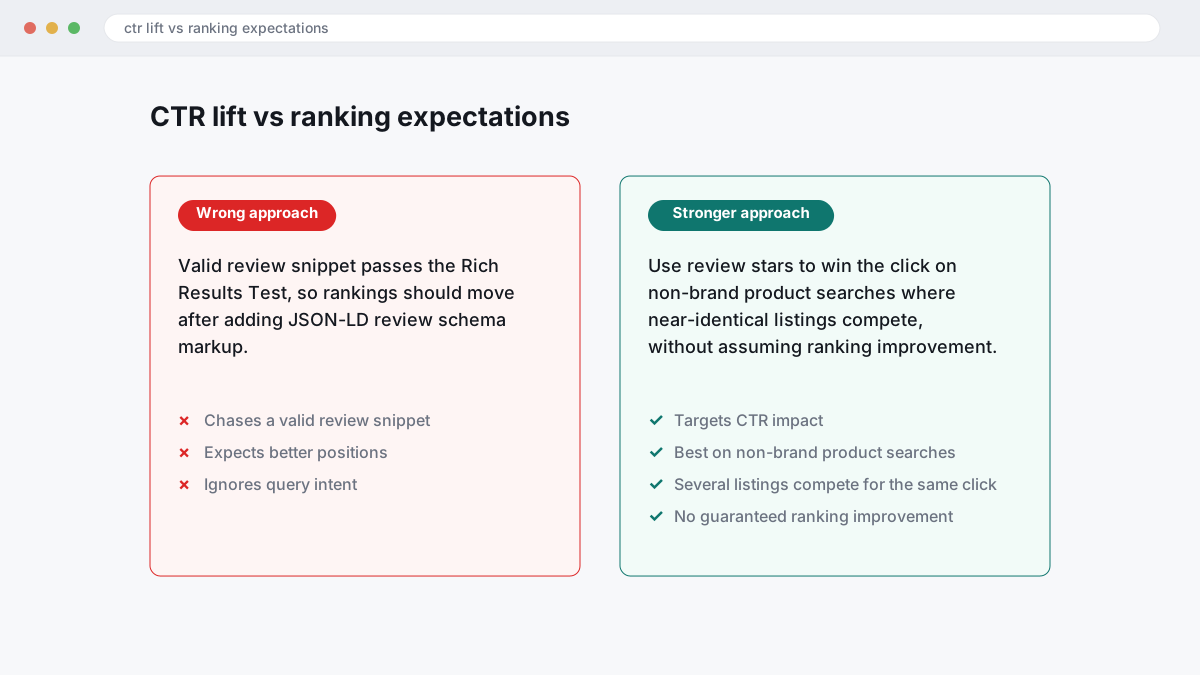
The wrong approach is chasing a valid review snippet because the code passes the Rich Results Test, then expecting rankings to move. That fails because Google can parse JSON-LD perfectly and still treat the page the same in rank; the benefit, when it appears, is usually CTR impact from a more persuasive result, not a guaranteed ranking improvement. On a branded search, or on a result where your title tag and meta description already look weak, stars rarely rescue the click.
The right approach is to check Google Search Console first: is the page indexed, is the query already earning impressions, and is the snippet worth clicking before markup enters the picture. Fix broken indexing, rewrite thin titles, strengthen the visible on-page review evidence, then add schema. If you are weighing this against paid reputation work, BGR Review’s review packages start delivery in 24-48 hours and include a 30-day free replacement guarantee, but even then, weak snippets and poor indexing usually cap the upside.
How should ecommerce teams handle product review markup differently?
Ecommerce pages earn the strongest review-snippet eligibility when Product schema sits on the exact product detail URL, ties the AggregateRating to that item, and is backed by live offer data such as price and availability from Google’s Merchant listings guidance.
The wrong approach is sitewide markup on category, brand or search-result pages that list many products and one blended rating. That code can validate and still earn no stars because Google cannot tell which reviewed item the rating belongs to, and the on-page evidence is too broad. The right approach is one product, one reviewed entity, one product detail page. That works because the reviewed thing, the visible reviews and the structured data all point to the same SKU or model.
This comparison is where most ecommerce implementations go wrong.
| Page type | Markup choice | Likely result |
|---|---|---|
| Category or collection page | Shared Product schema with one AggregateRating across multiple items | Valid code, weak eligibility for review snippets |
| Single product detail page | Product schema plus AggregateRating, price, availability and matching visible review content | Clearer product understanding for Search and Merchant listings |
Variant pages need stricter review attribution. If red, blue and 128GB versions live on separate URLs, each page should either carry reviews for that exact variant or consolidate to one canonical product page where the rating genuinely covers all variants; mixing parent-level stars with child-level offers is a common reason stars never appear. If you use a plugin, check the JSON-LD after every theme or feed update. In BGR Review’s own implementation checks for clients buying Google or Trustpilot review packages with a 30-day replacement guarantee, plugin defaults often pull the parent product name while the visible page sells a child variant, which breaks alignment even though the markup still passes validation.
Where do manual actions and policy violations usually start?
Manual actions usually begin when your markup says one thing and the page shows another: hidden review data, inflated AggregateRating, or self-serving testimonials presented as independent reviews. Losing rich results is common; cleaning up the issue and waiting through reconsideration usually takes longer than preventing it.
The aggressive shortcut is simple: add star markup to a service page, pull a score from third-party review platforms such as Trustpilot or Yelp, and show no matching visible on-page review content. Google can parse that code and still treat it as misleading, because the user cannot verify the rating on the page itself. The safer implementation is dull by comparison: publish the real review excerpt, source it clearly, match the rating shown in the HTML and the JSON-LD, and avoid marking up testimonials you control as if they were editorial reviews. That is how you reduce the chance of a manual action for structured data abuse.
Copied ratings create a second risk outside Search. If you quote reviews from third-party review platforms, their own terms may restrict reuse, and disclosure law still applies. In the US, the FTC's rule on fake reviews and testimonials took effect in 2024; in the UK and EU, consumer-protection rules and the UK's DMCC Act rules on fake reviews also matter. Country and platform rules differ, and this is general information rather than legal advice. If you need the rating on the page, show the source, secure permission where required, and keep the markup tied to what a reader can actually see.
What does a practical star-rating recovery workflow look like this week?
Start with one URL that lost stars, compare it against one URL that still shows them and the template file that generates both, then fix parity before you touch anything else. That controlled page-by-page recovery works; random sitewide edits usually bury the cause, trigger fresh crawl noise in Google Search Console, and leave you guessing whether the break came from schema type, template output, or on-page review evidence.
Audit three things side by side: the affected page, the working page, and the source template or feed block that prints the JSON-LD. Check the schema type first, then AggregateRating fields, then whether the visible review content on the page still matches the markup. If Search Console shows a Manual action, stop there and fix the policy issue before you keep testing, because valid code will not recover stars while a review-snippet violation is still active.
After the fix, run the page through Google’s Rich Results Test and the Schema Markup Validator, then request indexing in Google Search Console and watch the page for 14 days. That window matters because Google can parse the new code quickly but still delay review snippet display while it recrawls templates, feeds and page content. If multiple revenue pages are involved, or the issue touches more than one template, merchant feeds, or a self-serving review setup, escalate fast. BGR Review sells review and reputation services openly, and where the problem is wider than one page, getting a technical and policy audit is usually cheaper than weeks of blind edits.
Where to go from here
Start with one page, not your whole site. Check whether that page is a genuine fit for a review snippet: the schema type matches the page purpose, the review source is allowed under Google’s self-serving reviews policy, and the rating evidence is visible on the page itself rather than hidden in JSON-LD. Run that page through Google’s Rich Results Test and the Schema Markup Validator, then compare the code against what the visitor can actually see.
If those pieces line up, code changes are worth your time. If they do not, fixing syntax will only give you valid markup with no stars, no CTR lift, and no help in the map pack or branded search. The usual outcome of a proper audit is clarity: either you have an eligibility problem to fix first, or you have a clean page that simply needs recrawling and monitoring in Google Search Console.
At BGR Review, this is the order we use before advising on review display pages or third-party review integration. It saves you from rewriting markup on pages Google was never going to reward.