
Quick answer
The best review request email is short, personal and built around one action: click a direct review link and leave an honest review. Send the first ask soon after service completion, delivery or check-in while the experience is still fresh, then send one reminder only if the customer did not act. Keep the copy plain, mention the product, job or location, and avoid asking for a positive review. Platform rules decide the format: Google Business Profile supports direct review links, while Yelp explicitly discourages businesses from asking customers for reviews.
This guide is written from live reputation operations, not email theory. At BGR Review, we handle review growth across Google, Trustpilot, Yelp, Clutch and TripAdvisor, and the same workflow that lifts response on Google can create a policy problem on Yelp or distort ROI for a multi-location brand.
We built this for people deciding how to ask for reviews by email without wasting sends or creating compliance issues. The practical bits matter more than generic copy tips: who gets the first ask, what happens after the click, when a reminder helps, when to stop, and why a direct review link plus clean conversion tracking usually tells you more than open rate alone.
Why do platform rules change how you should ask for reviews by email?
Review request emails do not sit under one universal rulebook. Google, Yelp and Trustpilot treat solicitation, filtering and incentivised reviews differently, so one email can be acceptable on one platform, weak on another, and a compliance problem on a third.
Most guides tell you to send one generic ask with links to every review site. That fails because the platform guidelines are different before the reader even clicks. At BGR Review, we split email asks by platform before any campaign goes live, because Google Business Profile review policy allows you to ask for reviews but prohibits review gating and fake engagement, Yelp says businesses should not ask for reviews, and Trustpilot permits invitations but expects a proper invitation method, a real customer relationship, and lawful handling of identity and consent.
This is the practical difference.
| Platform | What usually works | What creates risk |
|---|---|---|
| Email all genuine customers the same ask and send them to one direct review link. | Sending only happy customers, pre-screening sentiment, or offering rewards for a positive review. | |
| Yelp | Focus on service and let reviews happen naturally; use email for feedback or support follow-up instead. | Prompting directly for Yelp reviews, which can underperform and add policy risk. |
| Trustpilot | Use a compliant invitation flow tied to a real transaction and clear consent records. | Uploading poor-quality contact data, vague consent, or selective invitations. |
The right approach is platform-specific: Google asks can be broad and simple, Yelp asks should usually be avoided, and Trustpilot requests need cleaner list hygiene and a documented send method. That works because the email matches the site’s rules instead of forcing one template across three systems. If you ignore that split, you may get clicks without published reviews, weaker map pack click-through on Google, and avoidable cleanup later if a solicitation method crosses a line.
How do you send a review request email that gets completed reviews, not just clicks?
Use a short post-service review sequence: ask straight after a successful delivery, completed visit or resolved issue, send one direct review link, and stop once the customer reviews, raises a complaint, or ignores two reminders.
Most guides push a long nurture sequence. That fails because review request email timing matters more than volume. If you wait for a monthly newsletter or a generic “how did we do?” campaign, the customer has to reconstruct the experience from memory, and clicks leak before they reach the review form. A plumber who has just finished a job, a clinic that has closed a support issue, or an agency that has delivered a milestone has a better trigger than any calendar date.
The workflow is simple. Trigger the first email within a day of the positive event, use one CTA, and send one destination link only — your Google review form, your Trustpilot invitation flow, your Yelp page if you are following Yelp’s rules, or the platform you have chosen for that customer segment. Multiple buttons split attention. A direct review link cuts steps, which is what moves clicks into completed reviews and, later, improves map-pack click-through and conversions more than extra opens do.
Your reminder sequence should react to behaviour, not run on autopilot. If the customer clicks and completes, stop. If they reply with a complaint, stop the ask and move them into service recovery, because a second prompt after friction often creates the public review you were trying to avoid. If they do nothing, send one reminder after a short gap, then one final reminder, then stop after two unanswered follow-ups.
This is also where most DIY setups break. The email platform records a click, but nobody checks whether the review was actually posted, whether the customer hit a login wall, or whether a complaint reply should have paused the sequence. If you want a cleaner handoff, BGR Review’s review campaigns start in 24-48 hours and our review packages carry a 30-day free replacement guarantee, but the workflow above is still the right baseline if you run it yourself.
Which subject lines and opening lines earn opens without looking automated?
Clear subject lines usually win when they name your brand and the recent transaction. “How did your visit to Bristol Dental go?” beats “We value your feedback” because it tells the reader what this email is about before they open it.
Clever curiosity phrasing is the wrong move. “Quick favour” and “A tiny request” look like bulk outreach, hurt first-read trust, and get filtered mentally with promotions before your review ask ever reaches the local pack, branded search, or conversion stage you actually care about. Clear transaction-based subject lines work because they match the customer’s memory of the visit, order, callout, or booking.
Use personalisation fields only when your CRM data is clean. First name, product bought, staff member, or location can lift relevance; a broken field like “Hi {FirstName}” does the opposite and makes the whole message look automated. For multi-location businesses, the branch name matters most because “Your Leeds appointment with Oak Street Physio” feels real, while a generic head-office line does not.
Keep the opening under 40 words before the review request appears. BGR Review email sequences work best when the first line confirms the transaction in plain English, then places the review link directly after the ask: no throat-clearing, no brand slogan, no six-line preamble.
| Weak | Stronger |
|---|---|
| Quick favour | How was your roof repair with Atlas Roofing? |
| We value your feedback | Thanks for visiting Bristol Dental yesterday |
| Tell us what you think | How did your London office clean go? |
Which email templates fit first-time buyers, repeat customers and service businesses?
Review request emails work best when they match the relationship you already have with the buyer. A first order needs reassurance, a loyal customer responds to recognition, and a service client is more likely to act when you mention the visit date, staff member or completed job.
Most guides push one master template for everyone. That fails because customer segmentation changes what feels credible: a new buyer does not read the same way as someone on their fifth order, and a homeowner who met your technician expects different personalisation fields from an ecommerce buyer who never spoke to staff. If you later scale this with a managed review package, the same rule still applies; even BGR Review's verified review campaigns, which carry a 30-day free replacement guarantee, perform better when the ask matches the customer journey instead of using one blanket email.
Use the template that fits the transaction you are actually following up on.
| Segment | Template |
|---|---|
| First-time buyer | Subject: How did your first order of [Product Name] go? Hi [First Name], thanks for your first order with us. I wanted to check how your [Product Name] has been since it arrived on [Delivery Date]. If everything is as expected, would you leave a short public review here: [Review Link]? Your feedback helps new buyers decide with more confidence. |
| Repeat customer | Subject: Thanks for coming back, [First Name] Hi [First Name], we appreciate your continued orders with us. You have now bought from us [Order Count] times, and that loyalty means a lot. If you have 2 minutes, would you share your experience in a public review here: [Review Link]? It helps other buyers judge whether we are consistent over time. |
| Service business | Subject: Feedback on your [Service] from [Visit Date] Hi [First Name], thanks for choosing us for [Completed Job]. [Staff Member] visited on [Visit Date], and I wanted to make sure everything was completed as expected. If you are happy with the work, please leave a review here: [Review Link]. Mentioning the job itself usually makes the request feel genuine rather than automated. |
Keep the fields real. If your CRM cannot reliably populate product name, order count, visit date or technician name, strip those lines out rather than guessing, because bad merge fields damage trust faster than a plain email and can cost you the review before the reader even reaches the platform link.
How much does a direct review link change completion rates?
A direct review link usually matters more than polishing the email copy. If your customer has to search your name, pick the right branch, and then hunt for the review button, plenty of clicks die before they become published reviews.
Most guides send people to a homepage or tell them to “find us on Google”. That fails because search adds extra decisions, and extra decisions create abandonment on mobile. The cleaner route is a direct review link that opens the exact Google review destination for the exact location; for multi-location businesses, each branch needs its own location-specific URL, not one corporate destination that splits reviews across the wrong profile and weakens map pack signals for the branch that did the work.
This is the comparison that matters in the email itself.
| Route | What the customer has to do | What usually happens |
|---|---|---|
| Homepage or profile search | Search brand, choose branch, find review button | More drop-off, fewer completed reviews |
| Direct location-specific review link | Tap once and land on the review form | Less friction, more completed reviews |
Use a button CTA for the main action, then place the plain-text backup link underneath it. Buttons lift desktop click-through rate, while a visible URL helps on mobile mail apps that strip styling or break tracking parameters. In BGR Review fulfilment, this setup matters more than adding extra persuasion, because completion is usually lost in the handoff from click to review form, not in the sentence asking for feedback.
Do review request emails beat SMS, or should you use both?
SMS usually gets read faster, while email gives you more space for context, branding and a desktop-friendly route to the review form. The better channel depends on how your customers buy, the value of the job, and whether the review page is easier to complete on a phone or a laptop.
Picking one channel by habit usually wastes asks. A roofer chasing fast, local, mobile-first responses will often get more completed Google reviews from a short text sent soon after the job, while a web agency, dentist or accountant often gets better completion from email because the customer needs more context, a named contact and a clearer reason to spend two minutes writing. That customer segmentation matters more than personal preference. At BGR Review, we tell clients to split by service type, ticket size and device behaviour before they scale any review package with our 30-day free replacement guarantee.
Use channel-level conversion tracking before you choose a winner. Tag the email button and the SMS link separately, then measure two things: click-through to the review page and completed reviews on the platform itself. Fast reads mean very little if SMS creates taps but no posted review. Email often wins on completed reviews when the path needs explanation, especially for Trustpilot or Clutch, while SMS is usually stronger for Google Business Profile asks tied to quick calls, bookings and map-pack visibility.
A simple comparison works better than a blanket rule.
| Channel | Best fit | What to track before scaling |
|---|---|---|
| Considered purchases, higher-trust services, multi-location brands needing consistent wording | Unique link clicks, completed reviews, replies, branded search lift | |
| SMS | Local services, urgent jobs, mobile-first customers, quick post-visit prompts | Tap rate, completed Google reviews, calls and bookings after map-pack views |
| Both | Email first, SMS reminder or the reverse based on customer context | Which sequence produces more completions, not just more clicks |
Do review request emails actually increase reviews enough to justify the effort?
Review request emails earn their place when you can track delivered messages, review-link clicks and completed reviews by location or customer segment. If email adds reviews without much staff time, it belongs in your retention workflow.
Most teams judge the channel by open rate. That fails because opens do not tell you whether email deliverability held up, whether the direct link reached the right profile, or whether anybody finished the review. The useful setup is simple conversion tracking: tag each campaign, record sent, delivered, clicked and completed reviews, then match that against staff follow-up time and any software fee from your CRM or email platform. For local services, the payoff can be real; in BGR Review's dataset of trades businesses with complete enquiry-source data, observed from February to July 2026, 70–80% of calls and bookings were attributed to a Google Business Profile or Yelp listing rather than a website.
Run a two-week pilot before you automate anything. Send one review email after job completion or purchase, split results by branch, rep or customer type, and log how many manual chasers your staff still had to send. If one location gets clicks but no completed reviews, check the review destination first, then inbox placement, then whether the ask is landing too early for that segment.
The comparison that matters is added reviews against labour saved. If a manager spends an hour a day chasing feedback manually, and one email sequence removes most of that work while still lifting review volume, the software cost is easy to justify; if deliverability is weak and completed reviews barely move after two weeks, keep it manual and fix the list quality first.
Why do review emails get opens and clicks but still produce no reviews?
If your review emails get opens and clicks but no completed reviews, the subject line usually is not the problem. Drop-off usually happens after the click: poor email deliverability hurts trust, the landing path adds friction, or the review request email timing is wrong because you asked straight after a complaint or unresolved service issue.
Most guides blame the copy and tell you to rewrite the ask. That fails when reported sends are landing in Promotions or spam, because your follow-up sequence becomes invisible even though the platform shows “delivered”. Check sender reputation, domain authentication and reply history first, then send a plain-text version from a real mailbox people recognise. If a rushed ask triggers a fresh negative review instead, BGR Review handles removals on a pay-after-success model with $0 upfront and $449 per removed review link, but prevention is cheaper than cleanup.
Clicks without reviews usually point to a weak landing path. A direct review link should open the exact review form, not your homepage, not a profile chooser, and not a generic “find us on Google” page that forces another search. Google and Trustpilot both lose completions when the reviewer hits a login wall on mobile, so test the path on an iPhone and an Android device before you blame low intent.
Timing is the other leak. If you ask while the customer is still waiting on a refund, call-back or snag fix, sentiment suppresses completion even when the email gets opened. Hold the ask until the issue is closed, then resend once the outcome is clear; if you buy review support from BGR Review, packages carry a 30-day free replacement guarantee, but no guarantee fixes bad timing.
What should your reminder sequence look like before you stop asking?
A workable reminder sequence is one initial ask, one reminder after 4 to 7 days, and a final reminder only if the customer stays silent. More follow-ups usually increase annoyance faster than completed reviews, especially in local services where review request email timing lands close to the actual job.
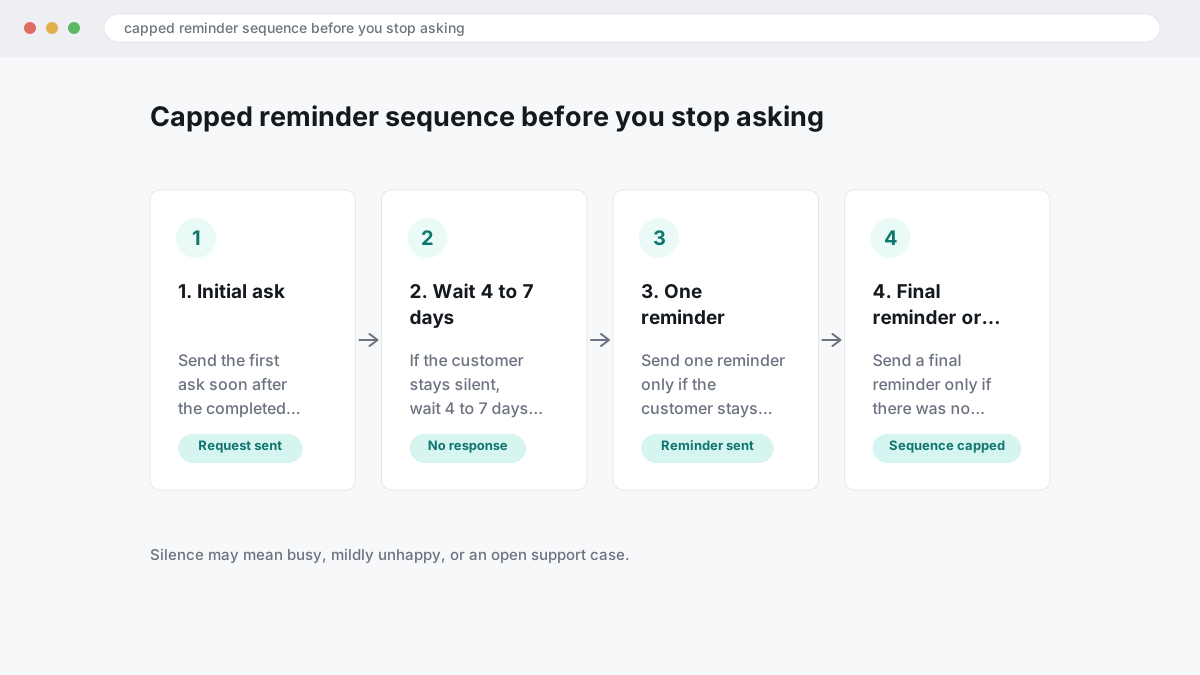
The wrong approach is chasing until you get any response. That fails because silence does not always mean hesitation; it often means the customer is busy, mildly unhappy, or has already opened a support case. The right approach is a capped reminder sequence: send the first ask soon after the completed transaction, wait 4 to 7 days, send one reminder, then send a last reminder only if there was no review, no reply and no unsubscribe. Stop after that. For one completed transaction, two reminders is the ceiling.
Clear stop rules protect response rates and your sender reputation. Stop immediately if the customer leaves a review, sends a complaint, unsubscribes, or contacts support, because another ask at that point drives down trust and can hurt future opens across your whole list. If you still need more review volume after a disciplined sequence, the fix is usually better segmentation or channel mix, not more chasing; for businesses that want an extra layer beyond DIY email, BGR Review's review packages carry a 30-day free replacement guarantee rather than pushing repeated asks to the same customer.
Is it legal to ask for reviews by email if you offer a discount or reward?
Asking for a review by email is usually lawful. The risk starts when you attach compensation, target only satisfied buyers, or fail to disclose that a reviewer received something of value; a discount for “leave us a review” can clash with platform guidelines and consumer-protection rules even if your email system allows the send.
Most guides treat any incentive as harmless marketing. That fails because incentivised reviews can bias the outcome, and in the US undisclosed paid endorsements can raise FTC endorsement-guide issues and the FTC’s 2024 rule on fake reviews and testimonials. Platform rules add another layer: Google’s Business Profile review policy prohibits content posted in exchange for money, discounts or free goods or services, and many platforms also ban review gating, meaning you should not email only the customers you expect to rate you highly.
The safer approach is simple: ask every qualifying customer on the same trigger, use neutral wording, and send the same direct review link regardless of sentiment. If you run a reward programme, separate it from the review request and make any disclosure explicit where the platform permits it; if the platform does not permit incentivised reviews, do not offer one at all. That protects your response mix, keeps your review profile cleaner for map-pack click-through and conversions, and avoids the mess of having to clean up policy-breaching reviews later.
Our position at BGR Review is strict here. We sell review growth services with a 30-day free replacement guarantee on review packages, but that guarantee does not change platform rules, and our $449 pay-after-success removal service is a poor substitute for compliant review collection. Rules vary by country and platform, including US FTC standards and UK consumer-protection enforcement, so treat this as general information rather than legal advice.
What should happen after someone leaves a review so the momentum keeps compounding?
Once a review is live, check that it posted on the correct profile, reply in the right tone, and record where it came from. Fast follow-up protects goodwill, catches service issues early, and tells you which email, link or channel actually produced the review.
Most guides treat the review as the finish line. That fails because response management affects what the next prospect sees in the map pack and whether that click turns into a call, booking or form fill.
If you run multi-location businesses, confirm the review landed on the intended branch before you answer. Then tag three things in your CRM or spreadsheet: review source, location, and sentiment. That simple log shows whether your post-job email works better than SMS in one branch, whether a direct Google link lifts branded search and local pack clicks in another, and where service friction is suppressing conversions even though reviews are still coming in.
Where to go from here
Your result will come from a tighter system, not a bigger send list. Use one platform-safe ask, sent at the right moment, with a direct review link, one reminder, and a clear stop point. Then track what happens after the click: which platform actually turns into posted reviews, which reviews lift map-pack click-through rate, and whether the extra trust shows up as more calls, bookings or form fills.
Your next step is simple. Pick the platform that matters most to revenue, write one email version for that platform only, trigger it from job completion or delivery, and send it to a small recent segment first. Check deliverability, review conversion, and reply rate before you scale it across locations or add Trustpilot, Yelp or Clutch into the mix.
If you want that managed end to end, BGR Review handles verified review acquisition across Google, Trustpilot, Yelp, Clutch and TripAdvisor, with a 30-day free replacement guarantee on review packages. Expect a platform-led setup, approved messaging, tracked follow-ups, and a cleaner view of which requests raise branded search demand and which ones just create noise.